As I explained in my article on the vulnerability scanner Sanca , whilst carrying out a vulnerability management project, I improved the detection process, thereby increasing my productivity. I was dealing with far more vulnerabilities, which meant sending far more emails to notify those affected.
The context
I was managing vulnerabilities across a very large number of servers. We used an EASM to monitor them, but it produced results that were so unreliable that I took some time off to develop Sanca. Thanks to this scanner, I was able to detect more vulnerabilities and no longer wasted time on false positives and duplicates.
As I was dealing with more vulnerabilities, I was creating more tickets.
Once the vulnerabilities had been assessed, creating a ticket was just a
repetitive manual task, so I automated it. By automating
everything that could be automated upstream, we were hitting a bottleneck at the final stage: sending
the emails.
We wanted to do things properly, so we had an email template in
which we would insert the recipient’s name, the server concerned,
details of the vulnerability and how to fix it. Everything needed
for a non-technical manager to understand and pass on to their
technical team, who would then have enough information to resolve the issue.
When we didn’t hear back, we’d send follow-up emails; we also had
a template for that.
I had reached a point where I was spending five hours every week sending
emails in Outlook to inform the relevant people about the
vulnerabilities I had discovered.
Every two weeks I would send reminders, but the more
vulnerabilities I had in the pipeline, the more reminders I had to send, and the more
time it took. I had reached a point where I was spending four days
sending out all my reminders.
It had become unbearable.
The process
I used to call these repetitive tasks “robot work”. Imagine doing that for 5 hours:
- Open Excel with the details of each vulnerability.
- Open Outlook to send the emails.
- Create a new message.
- Copy the template and paste it into Outlook.
- Copy the recipient’s first name from Excel and paste it into the correct place in the template.
- Copy the description of the vulnerability from Excel and paste it into the correct place in the template.
- Repeat this process for all the necessary details.
- Check the email before sending to ensure nothing has been omitted.
- Click “Send”.
- Fill in the “Date sent” column in the Excel file.
- Update the status of the ticket associated with the vulnerability.
- Repeat from step 3 for the next vulnerability.
It brings to mind the film Modern Times with Charlie Chaplin, when he works in the factory performing the same action over and over again, to the point where he even does it outside of work.
Being a freelance cybersecurity consultant shouldn’t feel like working on an
assembly line. It didn’t seem to bother my colleagues, who were diligently
carrying out the tasks they’d been asked to do, but it frustrated me a little more with every
email.
The client was paying for the services of a freelance cybersecurity consultant, at the
rate of a freelance cybersecurity consultant, to carry out freelance cybersecurity
work. As well as hating these repetitive tasks, I felt a bit
guilty about spending so much time on tasks to which
I was adding no value, even if this was a consequence of my own
productivity.
So I decided to automate the sending of emails.
The solution, automation
There was a reason why I hadn’t automated it sooner: the emails had to be sent from Outlook. No SMTP server to call from a Python script, no Thunderbird, no alternatives.
I initially considered PowerAutomate, a “no-code” tool from Microsoft designed
for automation, but it didn’t work properly and wasn’t selected.
As sending sensitive data via email is an irreversible action,
I needed a reliable tool; I couldn’t afford to send an
email to the wrong person or include the wrong information in the message.
So I looked for another solution, and that’s when I discovered AutoHotKey (AHK) , a small programming language designed specifically to automate Windows. It allows you to create keyboard shortcuts and interact with Excel, Outlook and other office software – it was exactly what I needed. And it didn’t matter that I’d never developed in AHK before.
After developing a script using AHK, the process of sending emails looked like this:
- Open Excel with the details of each vulnerability.
- Open Outlook to send the emails.
- Run the AHK script.
The script would scan through the Excel file, where 1 row = 1 vulnerability; for each
row, it would create a new email based on the template, insert the data where
necessary, and send the message. It would then fill in the
“Date sent” column in Excel and call the ticketing system’s API to change
the ticket’s status.
It followed the original process to the letter, there was no question of
compromising on quality, but it worked much faster than me and didn’t make
any repetitive errors. No need for artificial intelligence (AI); a good,
bespoke automation system does the job very well.
I’d gone from spending 5 hours a week on this to just 2 minutes – it was a huge relief. I did the same for the follow-up emails, and saved even more time. Now I could focus on detection, advising the teams responsible for fixing the vulnerabilities, and testing to validate the fixes.
Limitations of AHK and reimplementation in Python
The AHK script was a brilliant tool that I shared with the client and my colleagues, but it was a bit of a makeshift solution. There was no graphical interface; it was designed to perform a specific task but wasn’t very flexible and was difficult to adapt.
A few months ago, I was thinking back on this project and how useful it had been,
so I decided to develop a programme to control Outlook – a
neater version of my AHK script.
It has a graphical user interface: you select the Excel file to use for sending
emails, configure a few settings, and it controls Outlook to
send the messages as if I were sending them myself.
And as I was on a roll, I even made sure it was available in several
languages (French and English) and that it had two themes (light and dark).
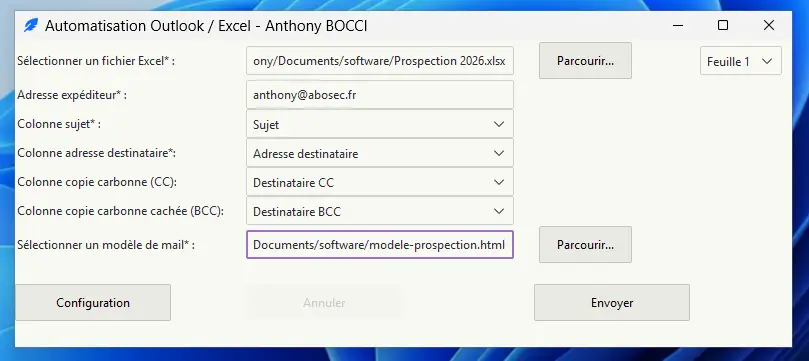
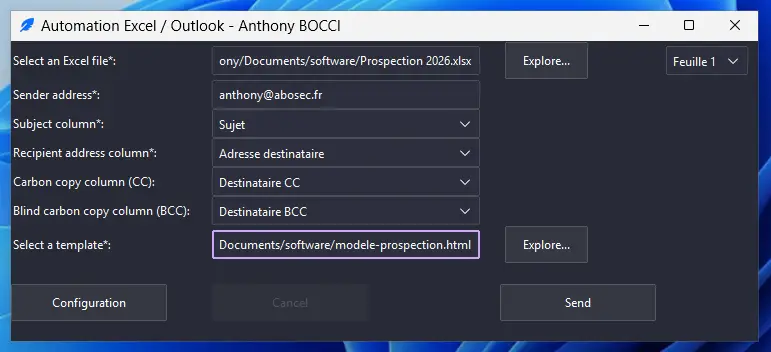
Using Outlook is handy when you’re stuck in a strict Microsoft environment without SMTP access. As the Python programme is cleaner and better structured, I’ll soon be adding the option to send emails via an SMTP server, without Outlook. This will have the advantage of working on all operating systems (such as Linux, macOS and OpenBSD), so I won’t need to launch a Windows virtual machine (VM) to use it.
What I learnt from it
Even more so than whilst developing Sanca, I realised just how much my value
as a service provider lay in providing solutions, and not just in “doing
cybersecurity”. When a client hires a freelancer, they want
someone who can get the job done quickly and well, working independently whilst
also being able to work as part of a team. Someone who doesn’t just complain
about problems, but who comes up with solutions.
I grumbled, a lot, but I came up with solutions to my problems. That year
we achieved 150 per cent of our EASM targets; I’m convinced that
automation played a part in that.
Are your teams wasting time on repetitive tasks?
Let’s talk about what we can automate
.